A twelve-year-old laptop is not a slow computer. It is a computer that was fast at a job it no longer has. The median web page weighed 1,208 kilobytes in October 2014. By July 2025 the same median page weighed 2,862 kilobytes — the desktop figure from HTTP Archive’s 2025 Web Almanac, measured across millions of sites rather than one.
Nothing in that sentence involves the hardware changing. The machine held still. The cargo got heavier, and then the software carrying it started charging more for the trip.
Where the weight went
Of the 2,862 kilobytes on a median desktop home page in 2025, images account for 1,058 and JavaScript for 697. Fonts take 139, CSS 82, and the HTML — the actual document — takes 22. Everything that used to be the page is now under a percent of it.
Bytes are not the interesting part. The Almanac is precise about the difference: images are pixels, and pixels are cheap to receive. “100 KB of JavaScript is work. The CPU must parse, compile, and execute that code.” A page shipping three-quarters of a megabyte of script is asking for three-quarters of a megabyte of interpreter time before it draws anything. A 2014 processor does not get to negotiate the rate.
There is a second bill, paid in memory. The same chapter notes that a 200 KB image can occupy 5 MB of RAM once decoded into raw pixels — a factor of twenty-five, invisible in any bandwidth measurement. Ten tabs are not ten documents. They can be ten decoded image sets, ten JavaScript heaps, ten compositing layers, all resident at once.
A tab has not been a document since 2008
Chromium’s multi-process architecture puts it plainly: “In general, each new window or tab opens in a new process.” Add the GPU process, the network service and the storage service, and a browser is no longer one application competing for memory. It is a small fleet with a shared budget.
When that budget runs out, nothing slows down in the way people expect. The kernel starts reclaiming and swapping, and the cost arrives as waiting. Linux’s pressure stall information documentation describes the symptom exactly: when CPU, memory or IO are contended, “workloads experience latency spikes, throughput losses.” Not a lower clock — a stall, measured as the fraction of wall-clock time a task spends not running.
That distinction is the whole diagnosis. A machine with 8 GB of RAM and twenty open tabs is rarely short of processor. It is short of memory, and the processor sits idle while the disk does the work. Which brings the two worst components in the machine into the same room, at the same time.
The percentage that never came back
In January 2018 the Spectre and Meltdown disclosures turned speculative execution from a free lunch into a liability. The fixes were kernel-level, and they were not free. Phoronix’s two-year anniversary benchmarks put numbers on it: an i7-5960X ran at 86 percent of its unmitigated performance, an i7-8700K at 84, an i5-9400F at 86, an i9-9900K at 88 — and an i9-10980XE, which carries hardware mitigations, at 97. On the server side a Xeon E3-1280 v5 came in at 77 percent.
A year later the same suite found the pattern unchanged and concentrated. Chrome 87’s penalties landed hardest “on the older CPUs lacking hardware mitigations.” Nothing was wrong with those chips. The contract changed: the same instructions, more cycles each, forever.
A percentage is the wrong way to read this if you own a 2014 laptop. Fourteen percent off a modern eight-core is a rounding error. Fourteen percent off a two-core mobile chip already running inside a 15-watt envelope, while a browser asks it to compile 697 kilobytes of script and composite ten tabs, is the difference between a tool and a chore.
The disk is where you feel it
Storage is the one place where a decade is not a percentage but an order of magnitude, and the reason is mechanical. Access time on a hard drive is the sum of seek, rotational latency, command processing and settle time — each one a physical event. At 5,400 rpm, average rotational latency alone is 5.56 milliseconds, and that is before the head has moved anywhere. At 7,200 rpm it is 4.17.
Queue a hundred small random reads and you have spent the better part of a second waiting for a platter to come around. That is what a boot sequence is, and an application launch, and a font cache miss, and a page swapped out to disk and read back.
An SSD has no platter to wait for: no moving parts, lower latency, higher IOPS. A current SATA drive of the kind that drops straight into a 2014 machine is rated by Samsung at up to 98,000 random read IOPS at 4 KB with a queue depth of 32, with a family endurance rating up to 4,800 TBW and a five-year warranty. The bus is old. The flash is not.
That is why storage is the first thing to change, and why the change feels disproportionate. You have not made the processor faster. You have removed the component that costs milliseconds from every interaction that used to queue behind it.
The paste is a wear item
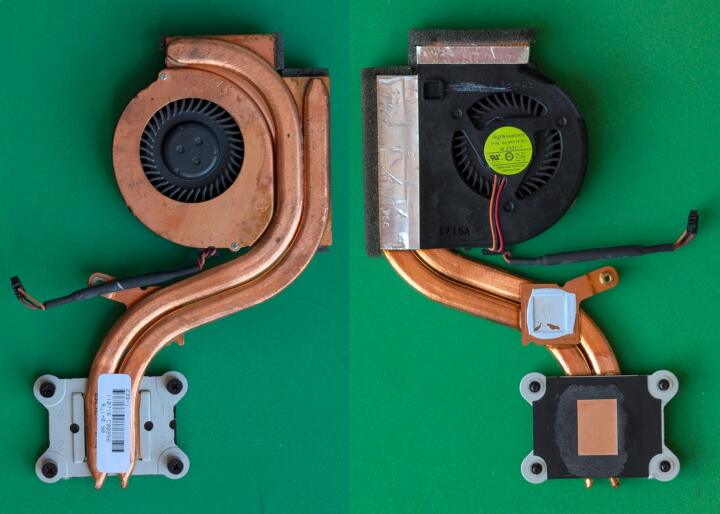
Thermal paste exists to displace air. Air is an insulator, and the compound’s only job is to fill the microscopic gaps between a silicon die and a heatsink so heat can cross. It is not a permanent component. Under repeated thermal cycling, viscous paste migrates away from the hottest zone — pump-out — while the oils in it can separate and dry over years of hot-cold.
The awkward part is that you cannot see this from one temperature reading. igor’sLAB’s long-term boundary-layer work found that “differences between materials and application forms are practically impossible to detect based on the initial temperatures,” and that a meaningful test needs up to 100 complete heating cycles before the interface settles into a state worth judging.
On a laptop, a degraded interface does not announce itself. It raises the temperature at a given workload by a few degrees, which raises the fan, which pulls more dust into fins that were already restrictive — and the firmware answers by holding a lower clock for longer. The processor is fine. The margin around it is gone.
What a resurrection actually is
Do the interventions in the order of the ratios. Storage first: milliseconds into microseconds, felt in every action. Memory second, if the workload is a browser. Thermals third, because a machine that throttles cannot use the speed it already has. Then software — and here a 2014 machine meets a wall that has nothing to do with its capability. Windows 10 reached end of support on 14 October 2025, and Windows 11 asks for TPM 2.0, UEFI with Secure Boot, 4 GB of RAM and 64 GB of storage — requirements most 2014 hardware fails on firmware alone. A Linux distribution with a compressed RAM block device for swap is the usual answer, not because it is faster in the abstract but because it installs.
None of this makes old silicon new. It restores the machine to its original contract: the processor is the quick part, the disk is not, and the workload fits in the memory that is there.
What did not degrade
The processor does not lose clock speed with age. The panel does not lose resolution. The keyboard is a mechanical assembly that either works or does not. Flash memory wears with writes rather than with years, which is why a decade-old SSD with a modest write history can still be inside its rated endurance while a decade-old hard drive is a bearing and a motor waiting to be asked.
So the twelve-year-old laptop was never a relic. It was a machine whose bottlenecks were reordered without its consent: heavier pages, dearer instructions, a cooling system that lost its margin, and a disk that was always the slowest thing in the box and is now the only slow thing left. Fix the order and it goes back to work — which is a better ending than a drawer, and a stranger one: the hardware never changed, and the machine got faster.
Sources: HTTP Archive, 2025 Web Almanac — Page Weight · HTTP Archive page weight report · Phoronix, Linux performance two years after Spectre/Meltdown · Phoronix, three years on — Chrome · Chromium multi-process architecture · Linux kernel, pressure stall information · HDD access time and rotational latency · Samsung 870 EVO specifications · igor’sLAB, thermal paste life-span testing · Microsoft Lifecycle, Windows 10 · Microsoft Learn, Windows 11 requirements.