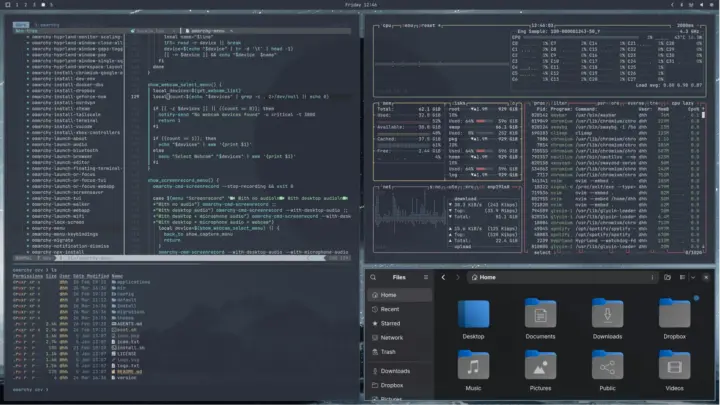
There is a particular kind of person who installs Arch Linux. You have either met them or you are them: the one who loses a weekend to a wiki that reads like a legal document, who picks a window manager the way other people pick a religion, who posts a screenshot and is immediately asked for the dotfiles.
Omarchy is what happens when someone who already did that work decides to hand you the result.
It is a Linux distribution from David Heinemeier Hansson — DHH, the creator of Ruby on Rails and co-founder of 37signals. Underneath is Arch Linux. On top is Hyprland, the tiling window manager. That is the same combination thousands of people assemble by hand, one config file at a time. The difference is that Omarchy arrives assembled: the bar, the launcher, the keybinds, the terminals, the fonts and the themes are already chosen, and already consistent with each other.
What it actually is
Worth being precise about, because the marketing blurs it. Omarchy is not a separate operating system the way Ubuntu is separate from Debian. It is Arch — a heavily scripted, opinionated Arch — with an installer and a desktop on top. When you type pacman, you are typing Arch’s pacman. When something breaks at 1am, the Arch wiki is still your manual. Omarchy’s real contribution is the part most people never finish: the defaults.
Version 4, named Quattro, shipped on 14 August 2026 and is the biggest release since the project started. The entire desktop shell was rewritten in Quickshell — the bar, the launcher, the menus, the notifications, the lock screen, the on-screen displays. Stable is currently 4.0.5; 4.5 is in release candidate. The whole thing is MIT licensed, which means you can take it apart and put it back together however you like.
On the machine this is written on: Omarchy 4, Hyprland 0.56.2, Quickshell 0.3.2, kernel 7.2.8-9-omarchy. A base install lands at 169 packages.
The defaults are the product
Every Linux desktop has defaults. Almost none of them are good. You get a grey taskbar, a wallpaper from 2009, and a font that renders like it is being viewed through a screen door. The first week of any new install is spent undoing somebody else’s decisions.
Omarchy’s defaults are the unusual part. The gaps are zero. The window borders are zero. The corner rounding is 8px, not 12 and not 20. Windows dim slightly when they lose focus rather than changing colour. Animations are off. There is one modifier key, and the whole desktop is reachable from it. None of this is remarkable in isolation. Taken together it is the difference between a desktop you configure and a desktop you use.
The configuration lives in Lua files under ~/.config/hypr/ — looknfeel.lua for appearance, bindings.lua for keybinds, monitors.lua for displays. You can override any of it. You just do not have to in order to get something that looks finished on the first boot.
The agent in the bar
This is the part that makes Omarchy a 2026 story rather than a 2022 one. Omarchy 4 wires AI coding agents into the desktop itself — into the bar, as system citizens, the way a battery indicator is. You can ask one to do something without leaving the window you are in.
Whether that is a feature or a fad depends on how you work. But it is the clearest statement of what the project is arguing: that the next interesting thing about a personal computer is not the wallpaper. It is how quickly you can go from thinking to doing.
What it gets right
- You do not rice it. The desktop arrives looking like something a designer touched. That is rarer in Linux than it should be.
- It stays consistent. Every application inherits the same palette, the same type, the same spacing. Nothing looks bolted on.
- Keyboard-first without the learning cliff. One modifier, documented bindings, a discoverable menu. You are productive in an hour, not a week.
- It gets out of the way. No telemetry, no store, no upsell, no account. It boots and it is yours.
Where it still bites
Honesty requires the other column.
Arch underneath means Arch problems. Omarchy does not shield you from the rolling release. An update can still land a broken package, and when it does, the fix is a terminal and a search. If that sentence sounds like a threat rather than a Tuesday, this is not your distro.
Opinionated means it argues with you. Zero gaps and zero borders are a look. If you want gaps, you will be editing config within the hour — which is fine, but it means the “it just works” promise has a boundary, and the boundary is your taste.
It is young and it moves fast. The 4.x line is still shipping weekly. That is exciting and it is also churn — features arrive, names change, a script you read about last month has moved.
Hardware is not guaranteed. Wayland and Hyprland are still rougher than the mainstream desktops on unusual GPUs, external displays and screen sharing. A decade-old laptop often runs it beautifully. A brand-new workstation with exotic hardware might not.
Who this is for
Omarchy is for the person who wants a Linux desktop that is already beautiful and already fast, and who does not want to earn it in a terminal first. It is for the developer who tried Hyprland and bounced off the configuration. It is for anyone who left macOS for reasons of principle and has been quietly missing the polish ever since.
It is not for the ricer. If the configuring is the hobby, Omarchy takes your hobby away and hands you a finished thing. Some people find that liberating. Some people find it boring. Both reactions are honest.
What the project understands is that “beautiful” and “opinionated” are the same word said with different intentions. Omarchy picks a side, commits to it, and lets you leave whenever you want. That is a good trade — and on this desk, it is the first Linux desktop in years that did not need a weekend to become one.
Sources and further reading
- Omarchy — omarchy.org · manual · AI integration
- Source code — github.com/omacom/omarchy (MIT) · v4.0.0 release notes
- DHH — “Omarchy is out” · world.hey.com/dhh
- The stack — Arch Linux · Hyprland · Quickshell
- Reference — Arch wiki · pacman